

Quick Answer:
To spot a fake guest posting site, first check its organic traffic trend and make sure the keywords bringing visitors match the site's niche. Then compare its DA with DR and referring domains, because a high score with little real traffic usually means the metric is inflated. Finally, scan its recent posts for spammy outbound links, fake authors and unindexed pages, and walk away if you find more than two red flags.
A seller sends you a list: DA 50, DA 55, DA 62, all for $40 each. It looks like a bargain. Two months later your rankings have not moved, three of the posts have quietly disappeared, and one of the "tech blogs" is now linking to online casinos from the same article as your brand.
This happens to new and experienced buyers every week. The problem is not guest posting itself. The problem is that metrics like DA are easy to inflate, while real readers, real rankings and a clean link profile are hard to fake. This guide shows you exactly what to check, in what order, so you can spot a fake guest posting site before you pay and spend your budget only on links that actually help.
What Counts as a "Fake" Guest Posting Site?
A fake guest posting site is a website that looks like a normal blog but exists mainly to sell links. It may show a strong authority score, yet it has almost no genuine audience and no trust in Google's eyes. Most fall into one of three groups:
- Link farms – sites that publish almost anything from anyone who pays, across every niche, with little or no editing.
- PBN sites – blogs inside a private network, often built on expired domains, that link to each other to pump up metrics.
- Inflated-metric sites – real domains whose DA or DR was pushed up artificially with spammy backlinks, while organic traffic stays tiny.
A link from any of these rarely moves rankings. In the worst case, it ties your site to a pattern search engines are trained to ignore or devalue.
Step 1: Check Real Organic Traffic, Not the Number in the Pitch
Traffic is the single hardest signal to fake over a long period, so start here. Do not trust a screenshot from the seller. Open the domain yourself in a tool such as Ahrefs, Semrush or Similarweb and look at three things:
- The trend line. Look at the last 12 to 24 months. A healthy site grows or stays steady. A sharp drop after a Google core or spam update is a strong warning that Google has already lost trust in the site.
- The keywords bringing traffic. A cooking blog should rank for recipes and ingredients. If its top keywords are brand names, random foreign terms, or "casino bonus" and "payday loan", the traffic is either fake or comes from content unrelated to its niche.
- The pages earning that traffic. If almost all visits go to the homepage or one old viral post, the rest of the site, including where your article will live, is invisible.
Also check the traffic country. If you sell to customers in the UK but 90% of a site's visitors come from a country you do not serve, the link has little real-world value even if the numbers look large.
Two sites can share the same DA and still be completely different in value.
Step 2: Verify DA Instead of Trusting It
Domain Authority (DA) from Moz and Domain Rating (DR) from Ahrefs are third-party estimates. Google does not use either of them. They are useful for a quick filter, but they are also the easiest numbers for sellers to manipulate. Here is how to test whether a DA score is honest:
- Compare DA with DR. When one tool shows 55 and the other shows 12, someone has gamed one of the metrics. Real sites usually score in a similar range on both.
- Count referring domains. A high score backed by only a few hundred linking domains, many of them low quality, is a red flag. Genuine authority comes from a broad, natural spread of links.
- Look at who links to the site. Open the backlink list. If it is full of comment spam, foreign directories and sites with no content, the authority is borrowed, not earned.
- Check the domain history. Use the Wayback Machine. A domain that was a dentist's site three years ago and is now a "general news" blog is very often an expired domain turned into a link seller.
A useful rule: relevance and real traffic beat a high DA. A DA 30 site in your exact niche with steady readers will usually do more for you than a DA 60 site that writes about everything for everyone.
Step 3: Detect Link Farms by Their Outbound Links
The fastest way to expose a link farm is to look at who it links to. Open five of its most recent posts and study the external links inside them.
If you see three or more of these signs, treat the site as a link farm.
Watch for these patterns:
- Every post carries paid-looking links. Real blogs link out when it helps the reader. Link farms place two or three commercial, do-follow links in almost every article.
- Mixed spam niches. A "home improvement" post that links to a CBD shop, a crypto exchange and an essay-writing service is a clear sign that anyone with money can publish there.
- Exact-match anchors everywhere. Anchors like "best cheap SEO services" or "buy shoes online" repeated across posts are bought links, not editorial ones.
- A posting speed no real team could manage. Use a
site:domain.comsearch or the blog archive. Hundreds of new articles in a few weeks, all on unrelated topics, point to a link-selling operation. - "Write for Us" pages that list prices and DA. Genuine publishers ask for expertise and topic ideas. Link farms advertise metrics and rates.
Step 4: Read the Content and Check the Authors
Spend five minutes actually reading the site, the way a normal visitor would. Fake sites often give themselves away in the writing:
- Thin, generic articles that could have been written about any topic.
- Authors named "Admin", "Editor" or "Guest", or author pages with no photo, no bio and no other profiles online.
- No comments, no social shares and no newsletter, meaning no sign of real readers.
- Stock photos on every post and the same template you have seen on other sites from the same seller.
- Missing or fake contact details and an About page that says nothing about who runs the site.
If a site would not earn your trust as a reader, it will not earn trust for your link either.
Step 5: Confirm the Site Is Indexed and Healthy
Search site:domain.com in Google. Compare the number of indexed pages with the number of posts on the site. If the blog has 2,000 articles but Google shows only a few dozen, many pages are being ignored, and your post may never be indexed at all.
Then search for a few of the site's recent article URLs. If posts published in the last month are not in Google, that is a sign the site has lost crawl priority. Paying for a post on an unindexed page is paying for nothing.
The 10-Point Trust Score: Decide in Minutes
To make decisions faster, score every site you are considering. Give points for each check it passes and add them up.
Score every site before you place an order.
- 8 to 10 points: the site is very likely genuine. Go ahead.
- 5 to 7 points: ask the seller for proof, such as a live traffic screenshot from Google Search Console or samples of recent guest posts.
- 0 to 4 points: walk away, no matter how low the price is.
Red Flags in the Seller and the Deal
Sometimes the website looks fine, but the deal itself tells you something is wrong. Be careful when a seller:
- Sends a cold email with dozens of "high DA" sites across every niche at the same price.
- Refuses to share the domain name until you pay.
- Guarantees rankings or promises a permanent do-follow link with no written terms.
- Asks for payment through a method with no buyer protection.
- Offers no replacement or refund if the post is removed or never indexed.
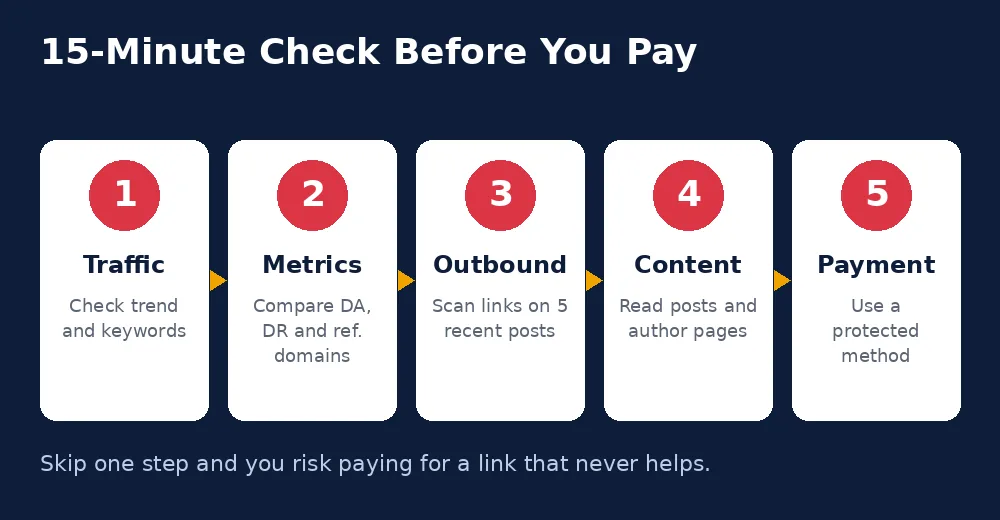
Your 15-Minute Check Before You Pay
Run these five checks on every site, every time.
You do not need hours of research for every order. Follow this sequence and you will catch most fake sites in about fifteen minutes:
- Traffic: confirm the trend is stable and the keywords match the niche.
- Metrics: compare DA, DR and referring domains for consistency.
- Outbound links: scan five recent posts for spam niches and paid anchors.
- Content: read a few articles and check the author pages.
- Payment: use a protected method and get replacement terms in writing.
After the post goes live, keep a record of the URL and check it again after 30 and 90 days to make sure it is still live and indexed.
A Safer Way to Buy Guest Posts
Checking every site yourself takes time. That is why many businesses prefer a marketplace where websites are reviewed before they are listed. At PB Outreach, you can browse sites with their metrics and niche shown upfront, and every placement is indexable. If you are planning a campaign, our backlinks calculator helps you estimate how many links you need, and our guest posting plans show clear pricing with no hidden terms.
Frequently Asked Questions
Is a high DA enough to trust a guest posting site?
No. DA is a third-party estimate that can be inflated. Always confirm it with real organic traffic, relevant ranking keywords and a natural backlink profile.
How much organic traffic should a guest posting site have?
There is no fixed number, but the traffic should be steady or growing and should come from keywords related to the site's niche. A smaller niche site with real readers is often better than a large general site with suspicious traffic.
Can a link from a link farm hurt my website?
In most cases, Google simply ignores such links, so you lose the money you spent. A large number of them, especially with exact-match anchors, can look like a link scheme and put your rankings at risk.
What is the quickest way to spot a PBN site?
Check the domain history in the Wayback Machine and look at its outbound links. A domain that changed topic completely and now links to many unrelated businesses is very often part of a private blog network.
What should I do if my guest post gets removed after payment?
Contact the seller with your order details and the live link screenshot you saved. A trustworthy seller will replace or refund the post. This is why written replacement terms matter before you pay.
Final Thoughts
A cheap guest post on a fake site is never really cheap. You lose the money, the time, and the chance to place that budget on a link that could have moved your rankings. Check traffic first, verify DA instead of trusting it, look closely at outbound links, and use the trust score before every order. A few minutes of checking today will protect your website and your budget for years.
Leave a Reply